
Vimeo Channel Gallery
The ’Vimeo Channel Gallery‘ plugin shows a video and a thumbnail gallery, which are reproduced on the player of a Vimeo user’s channel.
- Current version: 1.5.3
- Last update: 2013-01-14 10:44am GMT
- Downloads: 12,463
Demos:
- Vimeo Channel Gallery type user
- Vimeo Channel Gallery type channel
- Vimeo Channel Gallery type group
- Vimeo Channel Gallery type album
Features:
- It shows the latest thumbnail videos from a Vimeo user’s channel.
- When you click on one of the thumbnails the corresponding video is played on the upper player.
- The plugin uses the Vimeo IFrame player API, which allows Vimeo to serve the player in HTML5 format instead of a Flash format, so this can be used on mobile devices. On the sidebar of this page you can see an example of the plugin in action. The plugin can be downloaded from the WordPress web.
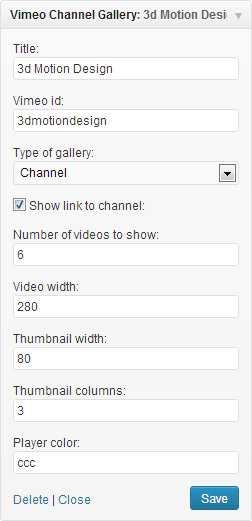 The plugin can be used as a widget or a shortcode.
- You can use multiple instances of the plugin on the same page, to show different Vimeo channels.
Widget fields:
- Title: widget title
- Vimeo username: The username of the Vimeo user’s videos to be shown.
- Show link to the channel: An option to show a link to the Vimeo user’s channel.
- Number of videos to show: It must be a number which indicates the number of thumbnails you want to show.
- Video width: It indicates the width of the video player.
- Thumbnails width: It indicates the width of the thumbnails. The height is automatically generated.
- Thumbnail columns: It assigns a numerical class to each thumbnail, based on the number of columns used to apply styles.
- Color: A color for the Vimeo player. You must insert an hexadecimal value of 6 digits without the #.
Shortcode syntax:
If you want to use the plugin as shortcode:
[Vimeo_Channel_Gallery user=”MaxonC4D” maxitems=”3″ theme=”dark”]
The attributes used in the shortcode are the same as the fields available in the widget, except the title field.
- user: name of the Vimeo user (required).
- link: show link to the channel. Values: 0 or 1 (optional).
- maxitems: number of videos to show (optional).
- videowidth: width of the video (optional)
- thumbwidht: Size of the thumbnails (optional) .
- thumbcolumns: Columns of thumbnails (optional).
- color: Color (optional).
Hi i used the Vimeo Channel Gallery widget.. but every time i click the play button i redirect to vimeo.com.. do you encounter this problem? please help
here is the link: http://marieclairearabia.com/%D9%81%D9%8A%D8%AF%D9%8A%D9%88/
I love your blog.. vey nice colors & theme. Did you create this website yourself or did
you hire someone to ddo itt for you? Plz respond as I’m looking
to create my own blog and would like to know where u got
this from. thanks a lot
Hola:
Me encanta este plugin, es justo lo que estaba buscando… pero hace algo muy extraño, cuando cargo la página la primera vez las columnas salen desconfiguradas y al refrescar se colocan en su sitio.
¿A que se puede deber esto?
pollofritofilms.com/novedades/
Agradecería mucho un poco de ayuda.
Hi!
Great Plugin. Works fine! =)
Is there a way to get widescreen thumbnails?
I searched Uncle-Google and found out, that there’s a possibility with a “private key” and advanced API or something.
Is there any way to import the descriptions as well?
My video galleries aren’t working properly on mobile devices. The first video is fine, but when I tap another one, it doesn’t load into the iframe…. Help!!
I am seeing the thumbnails duplicated twice on the page. is this a bug?
Oops, sorry, I forgot to give you the URL :
http://davidgarlitz.com/testing-testing
Thanks!
Dave
Hi! Great plugin! The only problem I’m having is that when I try the video thumbnails on an iPhone, they don’t work. The main video loads fine, but the thumbnails won’t load into the main window. The weird thing is : when I go to your site on the same iphone, the thumbnails work perfectly! Any idea what could be different from yours and mine? Maybe something in your functions.php file (my theme is based on the new twenty thirteen theme)?
Hope you can help!!
Thanks,
Dave
Hi,
Is it possible to not display the portait / byline / title / author on the main video, as you did on this page ?
I can’t find a way to do it.
Thanks 🙂
Hi,
I’m newer to WordPress and downloaded this plugin. I have it uploaded in the Widget menu, and it is an active Widget. I have all of the data entered into the panel in terms of channel, height, etc., but when I preview the pages, it is not displaying on the pages. I am not sure how to do this, let alone apply this to only a single page for a Video gallery within my site.
Thanks!
Hi Danielle
Could you send me the url of the page where you inserted the widget and the user id or playlist of vimeo?
The user Id on vimeo is AJ Brach. Our website isn’t officially up yet, but I am trying to get the widget to work on WordPress through the dashboard if that makes any sense.
Feature request!
I’d make great use of this plugin if it would be possible to add a link to a related page/post for every video.
Thanks
Hi Pete
I’m sorry, but the plugin does not provide that feature.
To all the people trying to sort videos: if you create an album on Vimeo, you can arrange your videos there however you want.
Is there a way to add video titles for each thumbnail?
Other than that, this is a good plug-in.
Thanks,
Kyle
Hi Kyle
These features will be in the next release.
Cool, Thanks!
Hi! Plugin Works great!
Quick question: I deleted a video from my vimeo and reuploaded it to try to adjust the order of the videos. The plugin is still displaying the old videos and links, so now one of my videos “no longer exists”. Is there a cache of some kind? How can i clear it?
You can see a demo of the error at chasedutton.com/feteboomwp -> the second video no longer exists. The vimeo channel/user is updated as it should be though.
I thought the cache might be on Vimeo’s side but I checked and the vimeo api is outputting the correct videos.
Any ideas?
The issue resolved itself. There must have been some cache file somewhere.
Great Plugin!
Hi chase dutton
You have more information here for RSS feed update time in WordPress:
http://codex.wordpress.org/Plugin_API/Filter_Reference/wp_feed_cache_transient_lifetime
http://wpengineer.com/1820/feed-cache-in-wordpress/
I guess, Vimeo made some changes and the plugin seems to be failed to work properly…
What I gotta do to make it work again?
Regards, Andy
Ukraine 🙂
p.s. Please, answer to me by email…. Thanks a lot for your great job!
Hi
I have not seen any change in the Vimeo player configuration. My plugin uses Vimeo player autoplay option to play videos. Vimeo says in the player documentation about the autoplay option “Automatically Play the video on load. Defaults to 0. Notice That this will not work on some devices.” http://developer.vimeo.com/player/embedding. I think I’ll have to use the api. It is working in my site
Actually, you can delete that earlier comment. Fixed it with a !important 🙂
One question, is there any way to randomize the videos and have them pull from your entire collection? Or is there a way to pick which videos are showed?
Thank you much!
Hi Matt
I’m sorry, but there is no way yet to sort videos.
Thanks for the plugin! It’s awesome. One thing I’m having a problem with is the far right cells and the right margin not going away.
I plugged in:
ul.ytchagallery li.ytccell-3, ul.vmgallery li.vmccell-3 {
margin-right: 0;
}
but my theme css is overwriting it. any suggestions?
Thank you!
This is great! Anyway to create Tool Tip like rollovers that can be formatted with CSS?
It is a good suggestion that I will take into account. Thanks
Howdy! What if you have way more videos than the max number? There isn’t a method in the shortcode to get to more videos. Any kind of pagination available?
No, there isn’t any method to get to more videos. To do so, I would suggest a plugin like TubePress. I would like to implement this functionality in the future, but not for now.
Is there a way to make the first thumbnail not be the same video that is in the player box.
Hi Tony
It is not implemented because I think it is necessary to display the thumbnails of all videos. Anyway, you can hide the first video using css:
.vmccell-1:first-child {
display: none
}